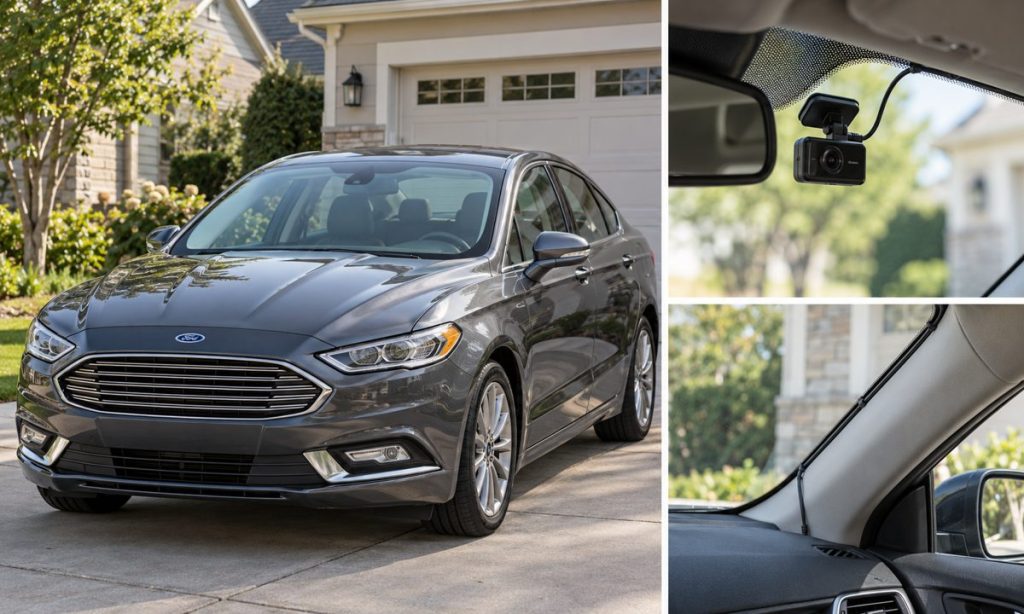
A dash camera can be mounted neatly in a Ford Fusion without taking apart the cabin, but a permanent power connection deserves care. The correct steps depend on the Fusion’s model year, trim, mirror equipment and fuse-box layout. A good starting point is to choose the camera position, plan a visible low-risk cable route, and decide whether a simple accessory outlet or professionally installed hardwire kit fits your needs.
Confirm the exact Fusion and camera setup
Identify the model year and trim from the registration or door label, then use the owner’s manual for that exact car. Fuse assignments and equipment can differ among Fusion years and powertrains, including Hybrid and Energi variants. Read the camera maker’s installation guide as well. Check whether the camera is powered through a 12-volt outlet, USB adapter, mirror adapter, or hardwire kit, and whether parking mode needs a constant-power circuit and a low-voltage cutoff.
Before sticking anything to the glass, sit in the normal driving position and check the camera’s field of view. Keep it out of the driver’s direct sightline and away from sensors, cameras, rain sensors, mirror controls, and any shaded or fritted glass area the device instructions say to avoid. Check the windshield wiper sweep and make sure the lens can see the road rather than a large portion of the hood. A small test fit with removable tape lets you check the view before committing the adhesive mount.
Choose a cable route that stays clear of airbags
Ford’s Fusion owner manuals warn against servicing or modifying side-curtain airbags, their fuses, the A-, B- or C-pillar trim, and the headliner. They also warn against placing equipment in the curtain airbag deployment path. Because the airbag deploys from the roof-side area, do not tuck a cable behind pillar trim, under the headliner, or near an airbag cover simply because a video shows someone doing it on another car. A route that looks tidy can obstruct deployment or interfere with wiring.
For a reversible installation, keep the lead visible along the windshield edge and use only a purpose-made clip or channel that does not cover the camera view or obstruct controls. Do not stretch a wire across the steering wheel, pedals, shifter, or passenger footwell. Do not route it where seat tracks, door hinges, sharp edges, heat, or moving trim can pinch it. If the cable cannot be secured safely without removing trim, ask a qualified automotive-electronics installer to identify a route for the exact vehicle.
Do not assume a gap around the A-pillar is an approved wire channel. Ford’s manual specifically says not to service or modify the pillar trim or curtain airbag system. Avoid removing that trim yourself. If a professional installation requires access near an airbag or restraint-system wiring, the installer should follow Ford service procedures and appropriate electrical isolation steps.
Decide between an outlet and hardwiring
A camera plugged into a fused accessory outlet is usually the simplest option when that outlet switches off with the ignition and the camera does not need parking surveillance. It avoids choosing a fuse position or altering the vehicle wiring. Verify outlet behavior in your specific Fusion: some outlets may remain powered for a period after shutdown, and camera adapters vary. Keep the plug and cable from interfering with the gear selector, climate controls, or passenger movement.
A hardwire kit can hide excess cable and support parking mode, but it adds a connection to the vehicle’s electrical system. Use a kit made for the camera and the vehicle’s electrical system, with its specified fuse protection and low-voltage cutoff. Never select a fuse by guessing, use an airbag or restraint-system circuit, defeat a fuse, or stack an accessory connection in a way that compromises protection. A fuse chart does not by itself confirm that a circuit is suitable for an aftermarket device. If the kit instructions do not identify an appropriate circuit and method for your year, have an installer handle the connection.
Before work, switch the car off and follow the camera and Ford instructions. Do not probe unfamiliar wiring or disconnect high-voltage components on Hybrid or Energi models. Stop if the job involves restraint-system connectors, orange high-voltage wiring, a warning light, or a fuse assignment you cannot positively identify. Those are reasons for professional service, not opportunities to experiment.
Install, test and secure the camera
Clean the glass with the camera maker’s recommended method and mount the camera only after confirming the final lens position. Leave enough slack for vibration without making a hanging loop. Secure the cable so it cannot fall into the driver’s view or snag when the mirror is adjusted. Follow the camera instructions for memory-card setup, date and time, firmware, and recording settings.
With the installation complete, test the camera with the engine off, accessory power on, and engine running. Confirm that it starts and shuts down as expected, records both audio and video settings you intended, and does not interrupt radio reception or trigger warning lights. Check again after a short drive and verify the camera’s view at night. If using parking mode, confirm the camera enters and exits that mode as designed and that the cutoff works; do not leave a device drawing power if it causes a weak-battery condition.
Review local rules for windshield-mounted devices and audio recording. Laws vary by location and can change, so check current rules for the places where the car is driven. Keep the camera from blocking the driver’s view and respect the privacy of passengers and other road users.
Frequently Asked Questions
Can I hide the dash-camera wire behind the Ford Fusion A-pillar?
Do not assume that is safe. Ford warns owners not to service or modify the pillar trim or curtain airbag system. Ask a qualified installer to route the wire while preserving the airbag deployment path.
Can I power the camera from the 12-volt outlet?
Often, if the outlet and camera adapter are compatible. Check whether the outlet switches off with the vehicle and whether parking recording is needed; outlet behavior may vary by model year and equipment.
Do I need a hardwire kit for parking mode?
Usually a parking-mode setup needs a power source available when the ignition is off plus a suitable low-voltage cutoff. Confirm the camera instructions and have the circuit selection checked for your exact Fusion.
Can I use any fuse for a dash camera?
No. Do not guess or connect to safety-system circuits. Use a manufacturer-approved installation method and correct fuse protection, or have an automotive-electronics technician do the work.
Will one wiring route fit every Ford Fusion?
No. The model year, trim, mirror sensors, powertrain and camera kit can change what is practical. Confirm the equipment and instructions for the exact car before installing.
Final Words
A safe Fusion dash-camera installation starts with a clear windshield position and a cable route that stays away from restraint systems, pedals and moving parts. Use an accessory outlet for a simple ignition-switched setup when it meets your needs. For concealed wiring or parking mode, have a qualified installer choose a protected circuit and preserve the airbag path. For other 2016 Fusion lighting fitment questions, see our guide to LED headlights for the 2016 Ford Fusion; verify dash-camera compatibility separately.
References
- Ford 2016 Fusion Owner’s Manual (curtain-airbag and restraint-system precautions; use the manual for the vehicle’s model year).
- Ford 2018 Fusion Owner’s Manual (vehicle-specific safety and equipment information).