
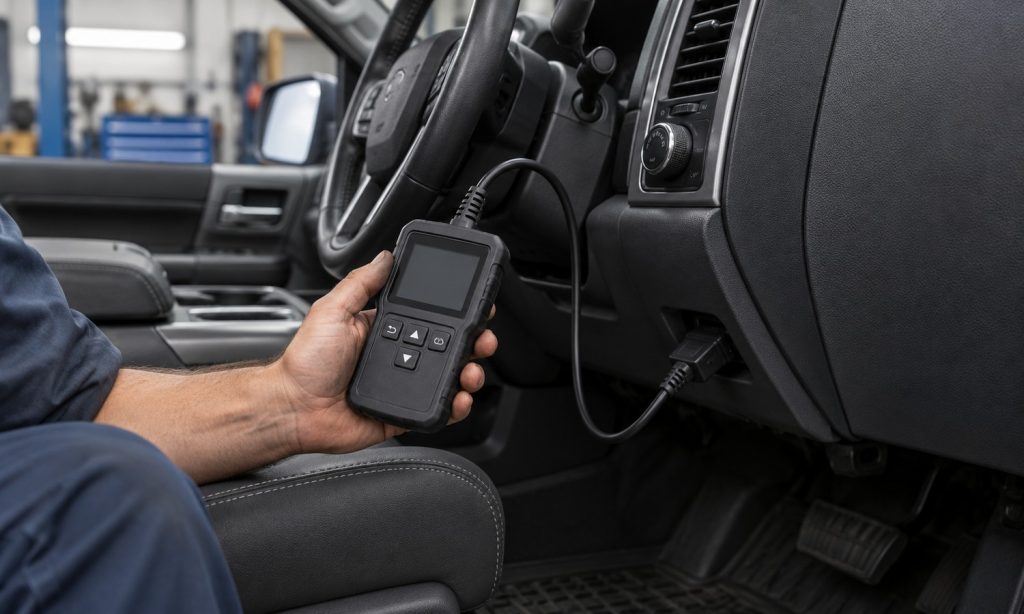
If you use several Chevy, Ford, and Dodge vehicles, a scanner that reads only engine codes may be enough for routine check-engine troubleshooting, while ABS, airbag, transmission, or service functions require model-specific support. We compared seven wired OBD-II tools by their advertised system coverage, live-data options, ease of use, and limitations. Use this list as a starting point, not a promise that every feature works on every vehicle. Check the year, model, engine, and desired function in the manufacturer’s coverage tool before buying. For Dodge Ram owners, see our guide to checking OBD2 scanner compatibility with a Ram 2500; diesel owners can also compare our Ford diesel scanner picks and Ford 6.7 diesel OBD2 guide.
Quick Picks
| Product | Best For | Key Detail | Purchase | Review |
|---|---|---|---|---|
| FOXWELL NT301 | Engine and emissions checks | Reads engine codes, live data, and readiness; no battery-health or ABS/SRS test | View on Amazon | Jump to Review |
| Innova 5210 | OBD-II readiness | Newer FCA gateway limits | View on Amazon | Jump to Review |
| Autel AutoLink AL519 | Enhanced system scans | No maintenance resets | View on Amazon | Jump to Review |
| FOXWELL NT604 Elite | Mixed-make diagnostics | Vehicle-selective modules | View on Amazon | Jump to Review |
| Innova 5410 | Engine plus selected ABS/SRS | Verify functions by VIN | View on Amazon | Jump to Review |
| Innova 5310 | Tablet interface and broad scans | Confirm TPMS and module support | View on Amazon | Jump to Review |
| Innova SD35 | Owners needing broader scans on supported vehicles | Check Innova’s vehicle/function coverage before relying on a specific module | View on Amazon | Jump to Review |
FOXWELL NT301

What We Like
- Engine-code reader
- Live data
- I/M readiness function
- Wired handheld design
What We Don’t Like
- Does not provide advertised ABS/SRS/transmission module scanning
- Basic tool; no advanced service resets
The FOXWELL NT301 is the simplest pick here: a wired OBD-II reader aimed at engine diagnostics, not a multi-module scan tool. Its listing highlights trouble-code reading and clearing, live data, freeze-frame information, and an I/M readiness shortcut. Those are practical functions for checking a check-engine light, reviewing emissions monitor status before an inspection, or watching basic sensor values while a vehicle is running.
It uses the vehicle’s diagnostic connector and its own screen, so there is no phone pairing or app account to set up for basic checks. The built-in code lookup can help translate a stored code into a starting point for research, while live data can show whether a value changes as expected. A code alone does not identify a failed part, though; compare it with symptoms and service information before replacing components.
The NT301’s scope is also its main limitation. It should not be presented as an ABS, airbag, transmission, or service-reset scanner. If you need manufacturer modules, special functions, or bidirectional tests, compare one of the broader tools below and check vehicle-specific compatibility. For owners of older and newer domestic vehicles that only need engine and emissions information, the basic layout keeps the workflow direct. Confirm OBD-II compatibility by model year and market before buying. On a mixed fleet, verify the connector and protocol requirements for older vehicles too, since model year alone does not guarantee every function.
My Recommendation
Choose this when you want a straightforward engine and emissions code reader for several household vehicles. It has fewer system functions than the other picks, but the simpler scope can be a sensible match for checking a check-engine light and viewing live engine data.
Innova 5210

What We Like
- Engine scan
- Battery and charging checks
- Bluetooth app support
- Live data
What We Don’t Like
- ABS coverage varies by vehicle
- Some functions rely on the companion app
Innova’s 5210 combines engine code reading with a battery and charging-system test, plus live data and Bluetooth connection to the brand’s repair app. That makes it a useful middle-ground choice for a household that wants to check a warning light and investigate starting or charging concerns without carrying a tablet-style scan tool. The listing includes Ford, Chevrolet, and Dodge among supported makes, while warning that coverage varies.
The live stream can help you observe engine values such as RPM, coolant temperature, fuel trims, or oxygen-sensor readings where supported. Battery and alternator tests give a separate view of electrical health. The companion app can add repair information and code context, but app-based features and available vehicle functions should be checked before purchase. A scanner’s trouble code points toward a diagnostic area; it does not prove which component needs replacement.
ABS access is listed as variable rather than universal, and special reset functions can also differ between vehicles. Innova maintains a model-specific coverage checker that lets shoppers verify available functions by year, make, and model. Use it for every vehicle you plan to scan, especially if ABS support is the reason you are considering this model. The 5210 makes the most sense when its battery tests and straightforward handheld format match your normal maintenance tasks. Use it as a first-check tool and keep the vehicle service manual nearby; unusual symptoms may need a professional scan or electrical test.
My Recommendation
The 5210 suits a DIY owner who wants more context than a basic reader, especially battery and charging checks alongside engine diagnostics. Verify the exact ABS and reset functions for each Chevy, Ford, or Dodge in Innova’s checker before buying.
Autel AutoLink AL519

What We Like
- OBD-II test-mode coverage
- I/M readiness key
- Color display
- Built-in code library
What We Don’t Like
- Engine/emissions focus rather than all-module diagnostics
- Autel AutoLink AL519: gateway access may vary
The Autel AutoLink AL519 is a wired OBD-II code reader for engine and emissions diagnostics. Autel lists support for the standard OBD-II test modes, a one-click I/M readiness key, a color display, live data, and a built-in code library. This is a practical feature set for checking stored or pending engine codes, reviewing monitor readiness, and gathering information before a repair visit.
It is designed for OBD-II vehicles, and Autel says the model works with most 1996-and-newer domestic and import vehicles. Its scope is narrower than the all-system scanners in this roundup: do not assume it can scan ABS, airbag, body, or transmission modules just because it connects to a car’s diagnostic port. The official AL519 page describes its OBD-II focus and readiness functions.
For Chevy and Ford vehicles, the basic emissions functions may be enough for routine code checks, but check protocol and model coverage for a specific vehicle. Dodge requires extra care on newer models because FCA secure-gateway restrictions can prevent some aftermarket tools from accessing systems without supported authorization. The Amazon listing flags a limit on later FCA vehicles; treat it as a compatibility warning and confirm with Autel before ordering. The AL519 is best for basic engine diagnostics, not programming or dealer-level service. Autel’s stated compatibility is broad but not absolute, so check the owner manual and the tool’s current support notes for exceptions. Confirm supported functions for the exact vehicle year.
My Recommendation
Pick the AL519 for conventional OBD-II engine and emissions work when you value direct controls and a color display. It is not an all-system scan tool, and newer FCA security gateways may block access, so confirm your Dodge’s year and required functions before ordering.
FOXWELL NT604 Elite

What We Like
- Engine diagnostics
- ABS/SRS/transmission scans
- Live data
- Automatic VIN identification
What We Don’t Like
- Does not include maintenance resets or relearns
- SRS crash data cannot be cleared
The FOXWELL NT604 Elite is the broadest FOXWELL handheld in this group, with the listing describing engine, ABS, SRS, and transmission diagnostics. It also advertises live data, automatic VIN identification, and code playback or reporting features. That extra module access can help narrow down warning lights beyond the engine, which is useful when a dashboard has both powertrain and chassis or safety-system alerts.
It remains a diagnostic reader, not a repair device. A stored fault must be investigated and repaired before clearing it, and the listing specifically says the tool does not provide service functions such as oil resets, battery registration, ABS bleeding, throttle relearn, or ABS relearn. It also cannot erase crash or collision data from an airbag system. The screen’s code information can guide further checks, but it does not replace a wiring diagram or mechanical inspection.
FOXWELL recommends checking the vehicle coverage checker, because module support varies by make, model, and year. Verify your exact Chevy, Ford, or Dodge and the specific system you need before purchase. Compared with a basic code reader, the NT604 is a better fit for multi-system troubleshooting; compared with professional shop equipment, its missing reset and relearn functions are a clear boundary. Buy it for supported fault-code access rather than the promise of universal repair capability. Match the tool’s coverage list to the exact trim and system, then use the manufacturer service procedure when a safety-related code appears.
My Recommendation
For a home garage that needs access beyond the check-engine system, the NT604 Elite offers the broadest wired module mix in this comparison. It makes sense when you want to read common ABS, SRS, and transmission faults, provided its coverage checker confirms those functions for your exact vehicle.
Innova 5410

What We Like
- Engine/ABS/SRS/transmission scans
- Live data
- App-based repair information
- Model-dependent system coverage
What We Don’t Like
- Coverage is selective by model and system
- Optional OBD-I adapters are separate
The Innova 5410 is an all-system-oriented handheld scanner that lists engine, ABS, SRS, and transmission code reading, live data, and app-connected repair information. It can be a useful choice when one garage tool needs to cover several domestic makes, because the product is not limited to check-engine codes. Innova describes compatibility with select vehicles rather than every model, so its feature list should be treated as a menu of possible capabilities.
On supported vehicles, live sensor values can provide more context than a stored code alone, and the app may help organize vehicle details or repair references. The 5410 can also accept optional OBD-I connectors for some older vehicles, but those are sold separately. Do not assume the same module list applies across a Chevy, Ford, and Dodge simply because the scan tool’s basic OBD-II link works on all three.
Innova’s coverage checker is the useful pre-purchase step: choose each vehicle separately and confirm the functions you intend to use. Pay particular attention to ABS and SRS coverage, which are commonly model specific, and to any advertised service reset. The 5410 is a sensible upgrade from a basic reader for owners who value a handheld screen plus app support. It is not the best choice if you need guaranteed access to every module or advanced bidirectional controls. For older vehicles, confirm whether the required adapter is included or must be purchased separately before relying on OBD-I support.
My Recommendation
The Innova 5410 is a flexible pick for mixed makes when you want an app-connected reader with multiple system access. Because the brand describes compatibility as vehicle-selective, check the feature matrix for each of your vehicles rather than assuming a function transfers across all Chevy, Ford, and Dodge models.
Innova 5310
What We Like
- Engine and selected ABS/SRS functions
- Live data
- Battery tests
- Maintenance features
What We Don’t Like
- Coverage varies by year, make, and model
- Not a substitute for dealer-level programming
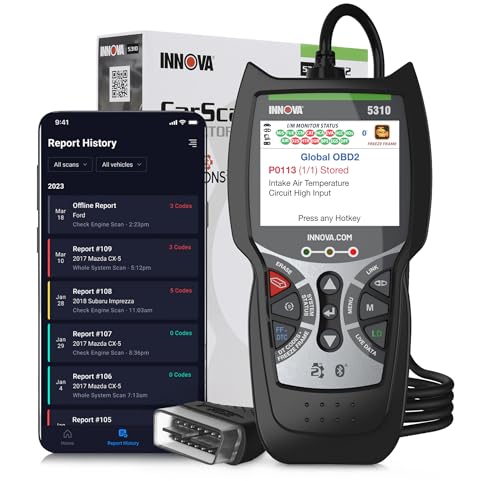
The Innova 5310 combines engine diagnostics with selected ABS and SRS functions, live data, battery testing, and maintenance features listed for compatible vehicles. Its wired handheld design can serve owners who want more than a basic check-engine reader but do not need a large tablet. The product page also describes a companion app for repair information and vehicle data, giving the scan process a useful phone-based reference when supported.
Use its engine functions to read diagnostic trouble codes, view live data, and check emissions readiness. The added ABS or airbag access depends on vehicle coverage; the same is true for maintenance resets and battery-related functions. A universal OBD-II connection does not mean every vehicle exposes its manufacturer-specific systems to every aftermarket scanner. Before diagnosing a safety warning, confirm the scanner can read that particular module and that you have a safe plan for handling the result.
Innova’s coverage checker lets you verify the exact functions for a year, make, and model before purchase. That step is especially important when the 5310 is being considered for a mixed garage of Chevy, Ford, and Dodge vehicles. Choose it when its combination of standard engine checks, selected enhanced systems, and battery features matches those coverage results. If you need deeper transmission data, active tests, or broad bidirectional control, compare tools designed for those functions and check their coverage lists too. Record codes before clearing them, and avoid resetting readiness monitors just before an emissions test unless you understand the drive-cycle requirement.
My Recommendation
Consider the 5310 if your priority is an approachable reader that combines engine data with selected ABS/SRS and battery functions. Its feature set is vehicle dependent, so use Innova’s checker to confirm the exact system and any reset you plan to use on each car or truck.
Innova SD35
What We Like
- Tablet-style display
- Engine scan
- ABS/SRS/transmission coverage
- TPMS listed
What We Don’t Like
- Feature support still varies by vehicle
- Innova SD35: verify supported functions
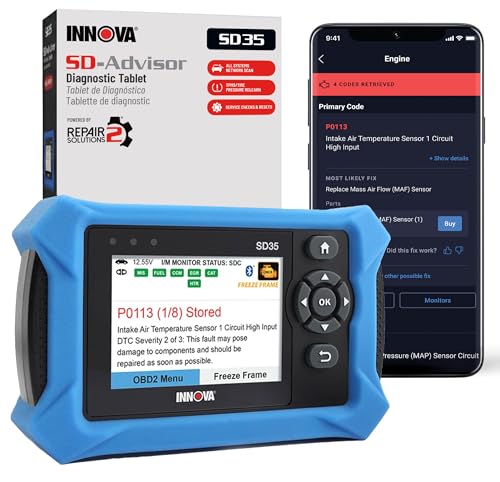
The Innova SD35 is the tablet-style option in this roundup. Its listing advertises engine, transmission, ABS, SRS, and TPMS diagnostics, along with live data and battery or alternator testing. A larger screen can make it easier to move through menus and view several readings at once than on a small handheld reader. The broader feature set is aimed at owners who want to investigate more than a single check-engine light.
The key buying question is whether those advertised systems are available on your exact vehicle. Innova cautions that coverage varies, and functions such as TPMS, ABS, and SRS can differ across model years and trim configurations. The OBD-II port provides a standardized way to access emissions-related diagnostics on compliant vehicles, but enhanced manufacturer systems still depend on the scanner’s software and vehicle coverage.
Check Innova’s coverage checker by year, make, and model before ordering, and confirm the specific module or service operation you intend to use. The SD35 may be more tool than necessary for a driver who only wants to read an engine code, but a larger interface and wider system list can be helpful for a multi-vehicle home garage when verified. Treat the scan results as diagnostic evidence to investigate, not as a direct instruction to replace a part. Before spending extra on a tablet scanner, identify the systems you actually need and verify their availability on every vehicle in your garage.
My Recommendation
The SD35 is the premium-style option here for owners who want a larger tablet interface and broad all-system coverage on supported vehicles. It is most compelling if your exact cars expose the systems you need; confirm TPMS, ABS, and SRS support in Innova’s coverage checker before paying for the expanded feature set.
How to Choose an OBD2 Scanner for Chevy, Ford, and Dodge
Start with the job you need the scanner to do. A basic check-engine reader handles many routine engine and emissions questions, while ABS, SRS, transmission, TPMS, and service functions need broader support. Check each vehicle individually; multi-make compatibility does not guarantee that every advertised function is available on every model.
Match the scanner to the systems you need
For an illuminated check-engine light, prioritize reading stored and pending codes, freeze-frame data, live engine readings, and emissions readiness. A simple reader such as the NT301 or AL519 may cover that workflow. If you need to inspect ABS or airbag warnings, look for enhanced system access and confirm those specific modules for your vehicle. Some tools advertise a broad module list but exclude service resets, relearns, or active tests, so read the limits as carefully as the headline features.
Verify year, make, model, and special functions
Use the scanner maker’s coverage checker before checkout. Innova’s checker lets you select a vehicle and review supported functions; FOXWELL also provides a coverage checker. On newer Dodge, Chrysler, and Jeep vehicles, secure gateway protections may restrict access unless a tool and authorization method support the vehicle. The Autel AL519 covers standard OBD-II functions, but it is not an all-system diagnostic tool. Confirm compatibility for each Chevy, Ford, and Dodge rather than relying on a brand-level claim. EPA-required OBD-II compliance applies to U.S. light-duty vehicles from model year 1996 onward, but that standard does not make manufacturer-specific systems universal.
Choose a format and data workflow you will use
Wired handheld readers are simple to plug in and operate without pairing a phone. App-connected tools can add repair references, saved vehicle history, or a larger view of live data; check whether an app or update plan is required. A tablet scanner can display more information at once but may be unnecessary if you only read engine codes. Compare the included cable, adapters, update terms, language options, and warranty. Keep a record of codes before clearing them, since erasing a code can remove useful diagnostic evidence or reset emissions readiness. A scanner narrows the search; it does not confirm a failed part by itself.
For related compatibility checks, see our guides to checking OBD2 scanner compatibility with a Dodge Ram 2500 and a Ford 6.7 diesel, plus our Ford diesel diagnostic scanner roundup. Use those as examples of coverage checks; they do not prove compatibility with your specific vehicle.
Frequently Asked Questions
Will one scanner work on Chevy, Ford, and Dodge vehicles?
Most OBD-II readers support many U.S. vehicles, but system coverage and special functions vary by model year and vehicle. Verify each vehicle separately with the scanner maker.
Do all OBD2 scanners read ABS and airbag codes?
No. Basic readers commonly focus on engine and emissions diagnostics. ABS and SRS access requires enhanced coverage, and availability varies by vehicle.
Can a scanner tell me exactly which part to replace?
No. A diagnostic trouble code points to a system or condition. Confirm the cause with service information, inspection, and appropriate testing before replacing parts.
Will these tools work on a 1995 vehicle?
Not necessarily. U.S. OBD-II was broadly required for 1996 and newer light-duty vehicles. Earlier vehicles may use a different connector or protocol and may need a compatible adapter or tool.
Can an OBD2 scanner clear a check-engine light?
Many can clear stored codes after a repair, but the light may return if the underlying fault remains. Clearing codes can also reset readiness monitors.
Final Verdict
For basic engine and emissions checks, the FOXWELL NT301 is the simplest fit. The Innova 5210 adds useful battery testing, while the FOXWELL NT604 Elite, Innova 5410, 5310, and SD35 target broader diagnostics on supported vehicles. The Autel AL519 is a capable OBD-II reader with a clear engine-focused role. Before choosing, verify the exact functions for every Chevy, Ford, or Dodge you plan to scan—especially ABS, SRS, TPMS, resets, and newer FCA access.
Affiliate disclosure: This article contains Amazon affiliate links. If you purchase through them, CarInsightPro may earn a commission. As an Amazon Associate I earn from qualifying purchases.

Pingback: Check OBD2 Scanner Compatibility for Ford Explorer