
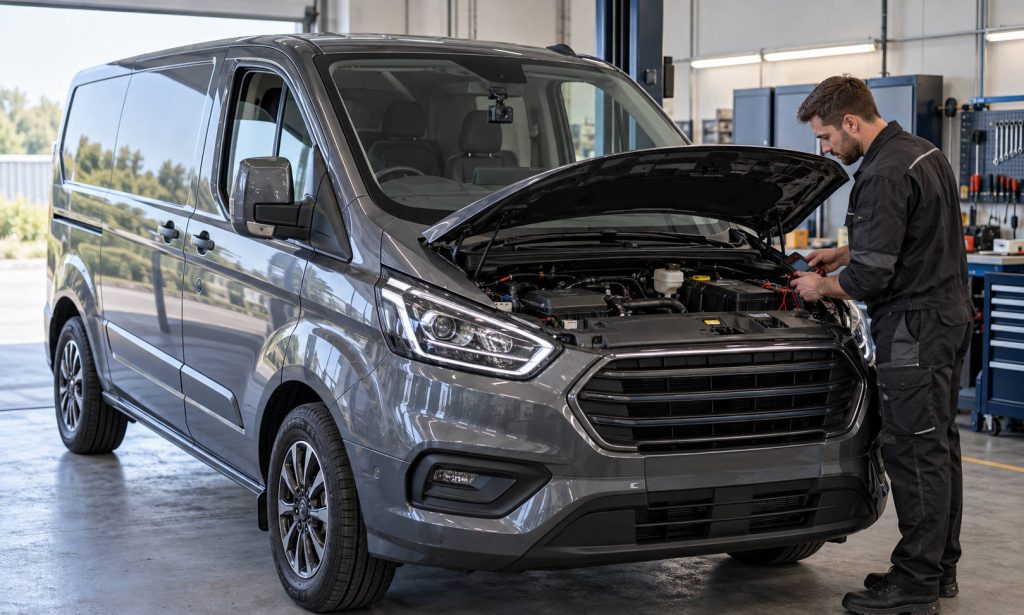
An accessory can drain a Ford Transit Custom’s battery when it keeps drawing power after the van is switched off. Common causes include a dash camera left in parking mode, a 12-volt outlet that remains live, an OBD device, poorly wired conversion equipment, or an electrical module that does not go to sleep. A weak or undercharged battery can make a modest normal draw look like a sudden accessory fault. Transit Custom versions vary by model year, market, battery arrangement, and battery-management system, so use the manual for your exact build. Begin by listing added devices and checking their off-state behavior; do not pull random fuses or ground accessories directly to the battery negative post on a vehicle with battery monitoring. The published Transit Custom dash-cam guide covers camera features; this article focuses on diagnosing battery draw.
Why an accessory can use power while parked
Some accessories need a constant 12-volt feed for parking surveillance, remote access, memory, or a control module. A dashcam hardwire kit may use both a constant-power circuit and an ignition-switched signal, allowing it to change to parking mode after the engine stops. If the camera is set to record continuously, its low-voltage cutoff is disabled or set incorrectly, or the switched signal is connected to the wrong circuit, it may draw power for hours.
Other devices can keep vehicle networks awake. OBD adapters, tracking units, auxiliary lighting controllers, inverters, camper equipment, USB adapters, and aftermarket alarms may continue communicating or supplying current after shutdown. A faulty cable, poor ground, incorrect fuse connection, or installation that bypasses the vehicle’s battery-management system can contribute to battery discharge or confusing battery-state readings.
Start with a simple, reversible check
Record when the battery goes low: overnight, after several days parked, after a short trip, or only after using a particular accessory. Note any warning messages and recent electrical work. Fully charge and test the battery before blaming an accessory; an old battery may not store enough energy even when the parked draw is within the vehicle’s normal range.
With the van safely parked and switched off, unplug nonessential devices from the 12-volt outlets and USB ports. Check whether an outlet remains powered after the key is removed and the vehicle is locked. Switch off dash-cam parking mode temporarily using the device’s settings, and disconnect removable OBD accessories. Change one item at a time and observe the result over comparable parking periods. Do not disconnect vehicle modules or remove fuses while the van is awake.
Inspect a dash camera or hardwired accessory
Check the camera’s settings for parking mode, time-lapse recording, motion detection, Wi-Fi, and battery cutoff. Compare the settings with the camera and hardwire-kit manuals. If the kit has a low-voltage cutoff, confirm that it is enabled and configured within the vehicle and accessory manufacturers’ requirements. A cutoff can reduce risk, but it does not make an incorrect connection safe or guarantee that an aging battery will start the van.
Inspect visible wiring for pinched insulation, loose connections, exposed copper, or cables routed across an airbag deployment path. Do not probe fuse positions or use a test light on an unfamiliar circuit. Modern vans can use different fuse layouts and battery-monitoring strategies across model years. Have a qualified vehicle electrician confirm whether a circuit is ignition-switched or constant, protect new wiring with the correct fuse, and keep cables clear of airbags and moving parts.
Respect the Transit Custom battery-management system
Some Transit Custom configurations use a battery-management sensor at the negative terminal. Ford documentation for applicable versions cautions against grounding added electrical devices directly at the battery’s negative post because that can interfere with the system’s battery-current measurement. Newer body-equipment manuals describe designated connection points for added loads. Those details vary by market, year, battery setup, and accessory current; follow the exact manual or approved conversion guidance for your van.
A battery-management system may temporarily disable convenience features when it detects excessive discharge. That protective response is a clue to investigate, not proof that one specific accessory is defective. Do not bypass the sensor, change the battery guard, or connect high-current equipment to an arbitrary point. Camper conversions, inverters, auxiliary batteries, and high-power devices should be designed and installed by a qualified specialist using Ford-approved connection points and protection.
When the fault needs a professional draw test
If the battery still discharges after removable accessories are disconnected, the cause may be a hardwired device, a module staying awake, a charging fault, an aged battery, or another circuit. A technician can fully charge and test the battery, verify charging operation, allow the vehicle modules to enter sleep mode, and measure key-off current using the correct procedure. The wait time before measuring matters because some modules remain active for a period after shutdown.
A current clamp or controlled diagnostic method can help isolate a circuit without repeatedly disconnecting the battery and resetting modules. Avoid putting a handheld multimeter in series with the battery unless you understand the meter’s current limits and the vehicle procedure; a large current can damage the meter or create a hazard. Tell the technician about all accessories, conversion work, battery replacements, and the exact time pattern of the discharge.
Record the conditions before testing
If the battery goes flat after parking, write down the model year and market, how long the van was unused, which accessories were connected, and any dashboard warning or battery-management message. Note whether the camera was in parking mode and the hardwire kit’s low-voltage setting. These facts help a qualified technician plan a parasitic-draw test; they do not identify the cause on their own.
Frequently Asked Questions
Can a dashcam drain a Transit Custom battery overnight?
Yes, if it remains powered in parking mode or is connected to a circuit that stays live. Check the camera’s power source, parking settings, and cutoff according to its manual.
Does unplugging the camera prove it caused the battery drain?
It is a useful comparison, but a single night may not be conclusive. Repeat the check under similar conditions and test the battery itself.
Can I attach an accessory ground to the battery’s negative terminal?
Some Transit Custom versions use battery monitoring that can be affected by a direct negative-post connection. Follow the exact vehicle or approved conversion instructions.
Should I pull fuses one by one to find the drain?
Not as a first step. Removing fuses can wake modules or reset systems, and the fuse layout varies. Have a technician isolate the circuit using the correct procedure.
What if the battery warning appears after I add camper equipment?
Stop using the added load if the van will not start or displays a charging fault. Have the wiring, fusing, connection point, and battery-management setup inspected.
Final Words
A Ford Transit Custom accessory is most likely to drain the battery when it stays active on a constant-power circuit, keeps a module awake, or was connected without accounting for the van’s battery-management system. Unplug easy-to-remove devices, check parking-mode settings, and document when discharge occurs. Leave fuse-box wiring and current-draw testing to a qualified installer when the correct circuit or ground point is uncertain. For camera-specific features, see the separate Transit Custom dash-cam article.
References
- Ford Tourneo Custom/Transit Custom Owner’s Manual, 2025 edition — battery-management and excess-drain behavior for the stated Australia/New Zealand build range.
- Ford Transit Custom/Tourneo Custom Body and Equipment Mounting Manual, 2023.75 — accessory installation and battery-management guidance.
- Thinkware Hardwiring Cable Instructions — general dash-camera parking-mode wiring checks.

Pingback: Ford 6.7 Diesel Battery Drain: Accessory Checks
Pingback: Why a Car Accessory May Drain the Battery: Checks