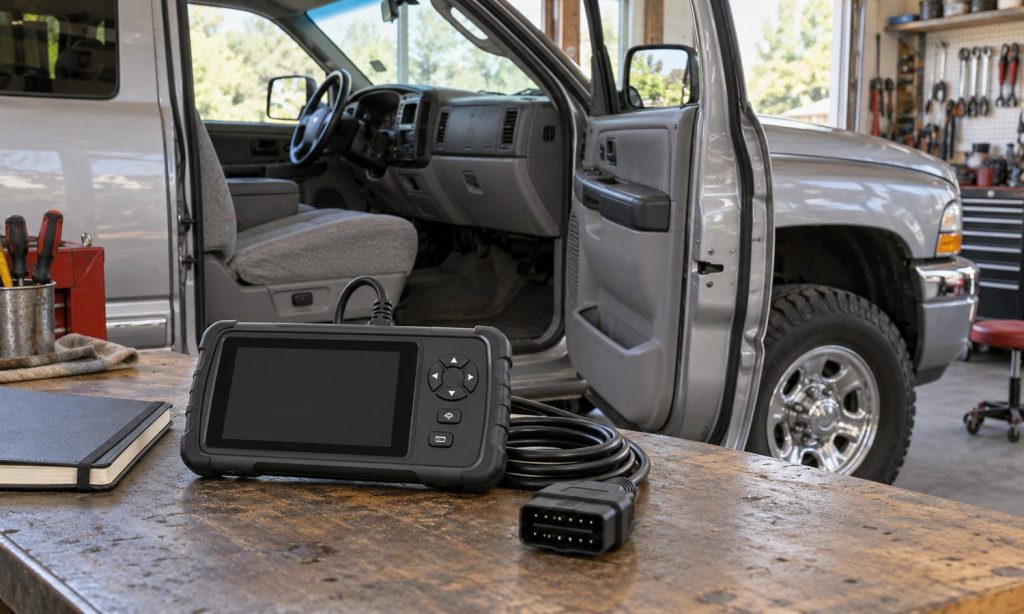
To check OBD-II scanner compatibility for a Dodge Ram, start with the truck’s model year, engine, market, and the task you need the tool to perform. A plug that fits the diagnostic connector does not prove the scanner can read every module or run every service function. Standardized OBD functions and enhanced manufacturer-specific coverage are different. And if your question is whether aftermarket headlights fit, a scanner cannot answer it: that requires vehicle and lamp application data. Use the steps below to match a scan tool to your Ram and keep headlight fitment as a separate parts-catalog check.
Identify the exact Dodge Ram
Record the model year, model (such as Ram 1500 or 2500), engine, fuel type, trim, and country where the truck was originally sold. Use the VIN and the vehicle’s emissions label or owner’s manual when a scanner maker asks for engine or market details. “Dodge Ram” spans multiple generations, powertrains, and diagnostic arrangements, so a general compatibility claim may not cover your specific vehicle.
Model year matters. In the United States, OBD-II became broadly required for light-duty gasoline vehicles from the 1996 model year, while heavy-duty applications had different timelines and requirements. Do not infer OBD-II coverage for an older truck or a particular diesel from the badge alone. Check the exact year and engine against the scanner maker’s supported-vehicle list. If the vehicle has an engine conversion or other major modification, ask the tool manufacturer which configuration to select.
Separate basic OBD-II support from enhanced coverage
Generic OBD functions cover a defined set of emissions-related information, such as supported powertrain trouble codes, readiness status, and some data. The exact functions depend on vehicle and tool support. SAE J1979 describes diagnostic communication between OBD systems and test equipment within the emissions-related scope; it does not mean every tool can access every control module.
Enhanced coverage is usually needed for additional systems or vehicle-specific functions. If you need ABS, airbag, body, transmission, or manufacturer-specific powertrain codes, check the scanner’s compatibility chart for that exact module and Ram year. A product page that says “all systems” may still have exceptions by engine, trim, software version, or subscription. Ask the tool maker to confirm the specific code-reading or service function you need before purchase.
Also distinguish reading a code from diagnosing a failed part. A diagnostic trouble code identifies a monitored condition; it does not by itself prove which component caused it. Save the code and freeze-frame data before clearing anything. Clearing codes can erase useful information and reset supported readiness monitors. A scan result does not certify a repair or guarantee an emissions inspection outcome.
Use a compatibility checklist before buying
- Vehicle match: Confirm the exact year, Ram model, engine, fuel type, and market.
- System coverage: Verify whether the tool supports engine only or also ABS, airbag, transmission, and body modules.
- Named function: Check for the exact test, reset, relearn, or bidirectional control you need; code reading alone may not include it.
- Software: Review app or operating-system requirements, update policy, and whether an ongoing subscription is needed.
- Connection: Confirm the tool’s required cable, wireless adapter, and supported vehicle communication protocols.
- Support: Save the manufacturer’s compatibility result and ask for confirmation if the chart does not list your engine or system.
For a second Ram-specific comparison, see our Dodge Ram 2500 scanner compatibility guide. Our general OBD-II scanner checklist explains how to compare a vehicle to a tool maker’s coverage chart. For other model examples, see the Dodge Charger V6 and Ford Explorer compatibility guides. Their vehicle-specific information does not transfer to your Ram.
An OBD-II scanner cannot verify headlight fitment
A scan tool may display a code from a vehicle system that monitors a lighting circuit, if that vehicle and tool support it. It cannot determine whether an aftermarket headlamp assembly physically fits, uses the right connector, matches the truck’s factory lighting package, or is approved for road use. For that, check the lamp maker’s application chart and a parts catalog using the exact year, model, trim, and VIN.
For a 2001 Ram, the Mopar parts catalog for a 2001 Ram 2500 lists different lamp parts for configurations such as quad-headlamp and Sport applications. That example does not establish fitment for another year or trim. Our 2001 Dodge Ram aftermarket headlight guide is a separate lighting reference; confirm every part against your own truck.
If a headlight flickers or fails, a code reader may not identify the cause. A fuse, ground, connector, bulb, wiring fault, or lamp assembly could be involved. Use the vehicle’s wiring diagram and service procedure, or have a qualified automotive electrician test the circuit. Do not bypass a fuse or install one with a higher rating. Follow manufacturer instructions before disconnecting the battery or working near electrical components.
Choose a scanner for the job, not the connector alone
If you only want to read a check-engine light on a supported vehicle, a basic scanner may be sufficient. If you need ABS, airbag, transmission, or service functions, confirm the exact module and operation in writing with the tool maker. Coverage differs among tools and may change with software updates. The connector fitting the truck is only one part of compatibility.
For broader comparisons, review our multi-brand OBD-II scanner overview, which compares tool categories rather than guaranteeing Ram-specific functions. Diesel owners can also consult our Ford 6.7-liter diesel compatibility checklist and diesel diagnostic scanner guide for questions to ask about enhanced coverage. Verify every tool against your Dodge configuration.
Frequently Asked Questions
Will any OBD-II scanner work with every Dodge Ram?
No. Model year, engine, market, and diagnostic function affect support. Confirm the exact truck and task in the scanner maker’s current compatibility chart.
Does a connector that fits mean the scanner is compatible?
No. A matching connector does not show that the tool supports the vehicle’s protocol, modules, software, or requested function.
Can a basic reader access ABS or airbag codes?
Not necessarily. Many basic readers focus on emissions-related powertrain codes. Confirm ABS or airbag support for your exact Ram and scanner model.
Can an OBD-II scanner tell me which aftermarket headlights fit?
No. Use a parts catalog and lamp-maker fitment chart with your year, model, trim, and VIN. A scanner does not confirm physical or road-use fitment.
Should I clear a code as soon as I read it?
Record the code and freeze-frame information first. Clearing it can erase diagnostic context and reset readiness information; diagnose the underlying cause before clearing.
Final Words
Check Dodge Ram OBD-II scanner compatibility by matching the exact truck to the scanner maker’s listed year, engine, module coverage, and function. Generic emissions data and enhanced diagnostics are different capabilities. For aftermarket headlights, use vehicle-specific parts information instead of a scan tool. If the compatibility chart is unclear, get confirmation from the manufacturer before buying or relying on a tool for diagnosis.