
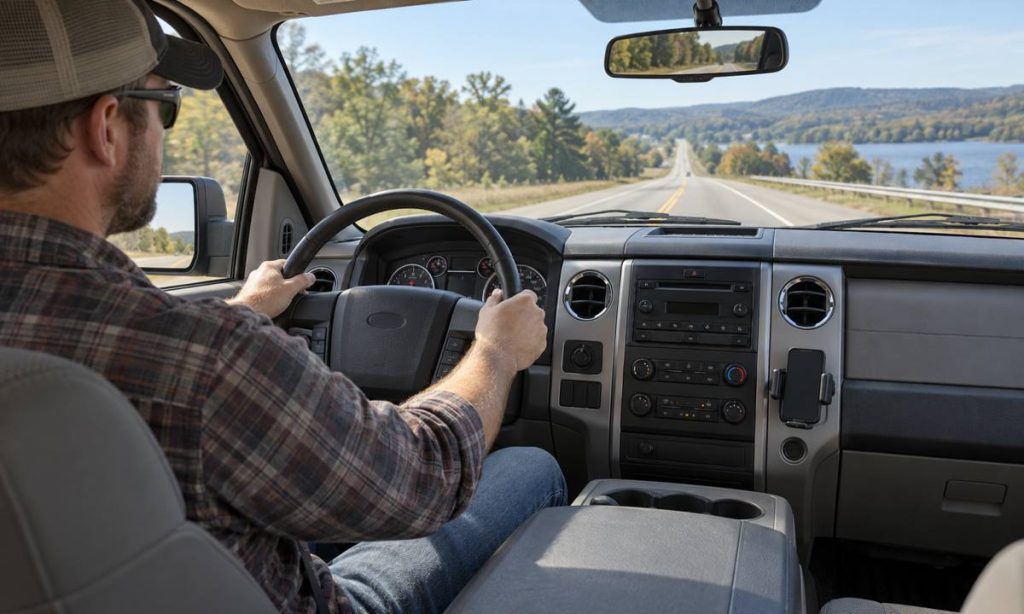
A phone mount in a Ford F-150 should make navigation easy to glance at while leaving your view of the road, mirrors, instruments, and controls clear. The truck’s dashboard shape, cab style, windshield angle, and equipment can vary by year and trim, so there is no single best location for every F-150. Before attaching a holder, sit in your usual driving position and check sightlines through the windshield and side windows. Keep the phone out of airbag deployment areas and away from controls you may need while moving. A mount also does not make handheld phone use safe or legal. NHTSA identifies phone interaction as a distraction risk, and state laws differ. Set directions before driving, secure the mount, and choose a placement that needs only brief glances.
Start with the driver’s view
Adjust the seat, steering wheel, and mirrors before evaluating possible mount locations. Look straight ahead, then scan the corners of the windshield, mirrors, instrument cluster, and side windows as you normally would. A phone should not cover a traffic signal, pedestrian, cyclist, road sign, or part of a mirror. Avoid placing it where you must lean, turn your head sharply, or look far from the road to read a map. Even a small device can obscure a critical sightline when it sits in the wrong area.
Check the view with the truck parked in a safe place. Look at the screen in portrait and landscape orientation if the mount rotates. Test the position with the seat at different settings if other drivers share the F-150. Also consider glare from sunlight, reflections at night, and the screen’s brightness. If you need to tilt or move the phone repeatedly to see it, select another location or adjust the holder before driving.
Compare common mounting locations
Dashboard mounts
A dashboard mount can keep the device below the windshield line and close to the center stack. This may reduce the amount of glass it covers and make navigation visible with a short glance. The dashboard surface must be stable and compatible with the holder’s adhesive, suction cup, or clamp. A curved, textured, dusty, or heat-softened surface can weaken a mount. Do not place it over a passenger airbag cover or where it blocks a screen, vent, switch, or hazard control.
Windshield mounts
A windshield mount can provide a clear screen, but it can also obstruct the driver’s view or be restricted by local law. State rules vary on what may be attached to the glass and where. Check current rules in the state where you drive rather than relying on a general online diagram. If a windshield location is allowed, keep the device outside the primary forward view, away from the wiper sweep and any sensors or camera areas. A position that looks unobtrusive from outside may still block a view from the driver’s seat.
Vent and cup-holder mounts
A vent mount can be easy to reach, but may block airflow or interfere with vent adjustment. In an F-150, center-stack layout changes by year and trim, so test that the holder does not cover radio, climate, or towing controls. A cup-holder mount can keep the phone off the windshield, but it may sit low and require a longer downward glance. It also occupies a cup holder and should not interfere with the gear selector, storage, or passenger use. Check for movement over bumps before relying on it.
Keep airbags and controls clear
Do not attach a phone holder, cable, or accessory to an airbag cover or in a deployment path. Airbag locations differ across F-150 model years, and the owner’s manual for the exact truck is the correct reference. The 2005 F-150 Owner’s Guide describes the vehicle’s safety restraint system; use the section for your configuration and avoid placing objects where the manual warns against them. Do not mount a device on a steering wheel, steering column, or trim marked for an airbag.
Keep the mount away from the instrument panel, mirror adjustment controls, lighting switches, defroster vents, and any display that you need to read. Make sure it does not interfere with steering-wheel movement, shifter operation, or visibility of warning lamps. If the truck has an aftermarket touchscreen or dash camera, check how the mount and its cable interact with those devices. Do not route a cable across the steering wheel, pedals, or an airbag path.
Choose and test the holder for the truck
Check the holder’s size range, attachment method, device weight limit, and whether it supports the phone and case together. Confirm that the clamp does not press side buttons or block a charging port. If the mount needs a metal plate, attach it according to the phone and holder maker’s instructions and consider wireless charging compatibility. Adhesive pads and suction cups can respond differently to heat, cold, dust, and dashboard texture. Clean the surface as directed and let it dry before installation.
After attaching the mount, tug it gently while parked and check that the phone stays in place when you tap the screen. Do not test stability while driving. Make sure the device does not rattle, bounce into the windshield, or shift toward the driver during turns. A loose mount can become a distraction or a projectile in a sudden stop. Remove it if the base begins to peel, the arm droops, or the phone repeatedly slips.
Reduce distraction before moving
Enter the destination, choose a route, connect audio, and adjust notifications before shifting into gear. Use voice control only when it does not demand sustained attention; hands-free operation can still distract you. NHTSA advises drivers to put phones away and avoid texting or messaging while driving. Do not watch videos, scroll, or type at a red light. If you need to change a destination or respond to a message, pull over in a safe, legal place first.
Set the screen so you can read a simple navigation prompt without focusing on small text. Reduce unnecessary alerts and avoid using a bright display at night. If a passenger can manage directions, let them handle the device. If the mount’s location encourages frequent interaction, reposition it or keep the phone stored and use audio directions instead.
Common placement mistakes
- Mounting the phone high in the windshield or directly in the driver’s forward sightline.
- Covering an airbag panel, instrument display, mirror, or essential control.
- Choosing a low position that requires repeated long downward glances.
- Using a mount that blocks an air vent, shifter, cup holder, or camera sensor.
- Leaving a cable loose near pedals, steering parts, or an airbag path.
- Assuming a hands-free mount removes distraction or overrides state law.
Frequently Asked Questions
Where is the safest place to mount a phone in an F-150?
There is no universal location. Choose a stable spot that does not obstruct the road view, mirrors, instruments, controls, or airbag zones, and verify it from your normal driving position.
Can I mount a phone on the windshield?
That depends on state law and the exact placement. Check current local rules and keep any permitted device outside your primary field of view and away from sensors and wiper paths.
Can a phone holder go near the passenger airbag?
Avoid airbag covers and deployment paths. Consult the owner’s manual for the specific model year and do not attach accessories where the manual prohibits them.
Is a vent mount better than a dashboard mount?
It depends on the truck’s layout and your sightlines. A vent mount may block airflow or controls; a dashboard mount may not adhere well to a textured surface. Test both while parked.
Does hands-free navigation eliminate distracted driving?
No. Voice prompts can still draw attention. Set the route before moving, limit interaction, and pull over safely if you need to make changes.
Final Words
Phone mount placement in a Ford F-150 is a visibility and distraction decision. Choose a stable location that keeps the windshield, mirrors, instruments, controls, and airbag areas clear, then test the setup while parked. F-150 dashboards vary by year and trim, and state rules for windshield devices differ. Prepare navigation before driving and keep interaction brief. If a holder shifts, blocks a view, or interferes with a control, remove or reposition it before the truck moves.
Pingback: Dodge Ram 2500 Phone Mount Placement and Visibility
Pingback: Ford Mustang Mach-E Phone Mount Placement and Visibility
Pingback: Ford F-150 Dash Cam Wiring and Routing Checks
Pingback: Best Cell Phone Holder for Hyundai Santa Fe: 7 Picks
Pingback: Best Cell Phone Holder for 2018 Ford Explorer: 7 Picks