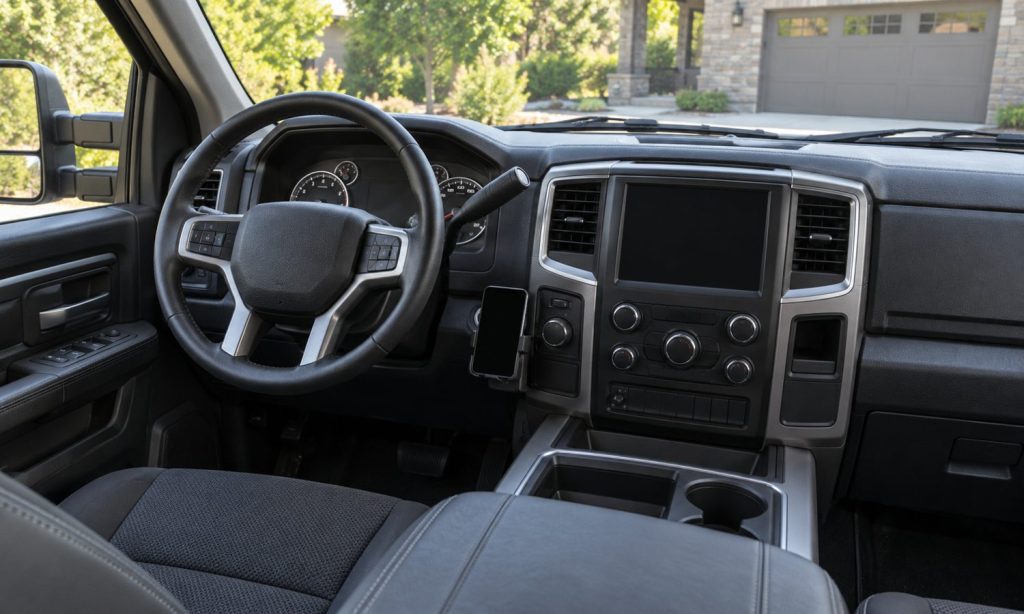
Phone mount placement and visibility considerations for a Dodge Ram 2500 begin with the driver’s view, the truck’s airbag locations, and access to essential controls. A mount should hold the phone securely without covering the road, instruments, mirrors, or switches, and without putting hardware or a cable in an airbag deployment area. The best position cannot be chosen from a photograph of someone else’s cab: Ram dashboards, seating arrangements, and driver sightlines vary by year and equipment. Set the seat and steering wheel first, then evaluate the phone in its actual case while parked. Finally, confirm the rules where you drive and configure navigation before moving. A secure mount can organize a device, but it does not remove the distraction caused by reading, typing, or handling a phone on the road.
Start from your normal driving position
Adjust the seat, steering wheel, and mirrors before evaluating a location. Sit normally with the seat belt fastened rather than leaning forward to make a position appear usable. Include the full phone, case, cradle, and mounting arm in the sightline check. The mount’s base alone does not show how much space the complete assembly occupies.
Look through the windshield and side windows from that position. Pay particular attention to areas near windshield pillars, where an additional obstruction can compound an existing blind area. Check the instruments and both mirrors as well. A passenger’s view or a camera photograph from the center of the cab does not establish what the driver can see.
Identify airbag areas before choosing a surface
Use the owner’s manual for the exact model year to identify the truck’s airbag locations and warnings. Do not attach a mount to an airbag cover or place the phone, bracket, or cable across a deployment path. Do not assume that a flat section of dashboard or nearby trim is an approved mounting surface.
For example, the 2022 Ram 2500/3500 manual warns against objects over or near the front airbags and on or around their covers. That example does not establish the detailed airbag layout of a 2004 truck or another generation. If a mounting position requires removing pillar trim, drilling near concealed equipment, or guessing where an airbag travels, have a qualified installer assess it.
Evaluate mounting locations by their limitations
A windshield location may put the display closer to the forward view, but the assembly can obstruct that view and windshield attachment is subject to applicable rules. A dashboard location may avoid some glass obstruction, yet surface texture, heat, airbag zones, and dashboard shape still matter. Neither location is acceptable simply because a suction cup or adhesive sticks there.
A vent location can interfere with airflow or place weight on parts that were not designed for that load. A console location may preserve windshield visibility but require a longer downward glance. Evaluate the actual geometry rather than assuming a category is universally best. If no position meets the truck, mount, visibility, and legal requirements, use another arrangement instead of accepting a compromise in an essential area.
Preserve access to controls and occupants
With the truck parked, check that the phone does not hide warning indicators, the hazard switch, climate controls, or other controls you need. Verify clearance from the steering wheel, column controls, and shifter through their intended movement. Bench-seat and center-console layouts can differ substantially, so a bracket fitted in one cab may obstruct another.
Check passenger space, knee clearance, cupholders, storage lids, and seat movement. A mount should not interfere with seat belts, child-restraint use, or normal entry and exit. Recheck the installation with the phone in both orientations if you intend to rotate it. Landscape mode can create a wider obstruction than the upright position used during installation.
Route power cables as part of the installation
Keep charging cables away from pedals, the steering column, moving seats, and shifter mechanisms. Secure excess length rather than letting a loop hang into the driver’s footwell. The connector should reach without pulling the phone or putting constant tension on the mount. Also check the cable when the mount is rotated or the seat moves.
Do not tuck wiring blindly behind trim that may contain airbags. A concealed route is not automatically a safe route. Use the vehicle and accessory instructions, and obtain professional help for hardwiring or trim removal when the safe path is unclear. A simple plug-in installation still needs a secure cable and a correctly rated power connection.
Check stability, glare, and shared-driver use
Follow the mount’s limits for phone dimensions, case thickness, and weight. Check its retention while parked with the complete phone installed. If the assembly slips, vibrates excessively, or requires frequent adjustment, correct the attachment before relying on it. Do not tighten a clamp beyond its instructions or use a damaged vent to support a loose mount.
Evaluate reflections in daylight and screen brightness after dark while stationary. A bright screen can be uncomfortable or reflect in the windshield. Set the display and notification behavior before departure. If several people drive the Ram, repeat the sightline and control checks for each person’s normal seating position; one driver’s acceptable setup may obstruct another’s view.
Separate legal placement from safe phone use
Check current windshield-obstruction and device-use rules for the jurisdictions on your route, including any restrictions for your driver category or commercial operation. A mount manufacturer’s compatibility statement concerns the product, not permission to use the phone in every location. Do not rely on a forum photo or an old summary of another state’s rules.
Enter destinations, select audio, and silence unnecessary notifications before driving. NHTSA identifies phone use as a source of distraction; hands-free operation does not make every task appropriate behind the wheel. If a route needs substantial adjustment or the phone falls, pull over safely before dealing with it. Do not reach into the footwell while the truck is moving.
Related guidance: phone-mount sightline and clearance checks in a Ford F150.
Frequently Asked Questions
Does the same mount position work in every Ram 2500?
No. Dashboard generations, trim, screens, seating, and driver height change the available space. Verify the exact application and test the full installation from the driver’s normal position.
Can I mount the phone over an unused switch blank?
Do not assume the visible blank proves a safe attachment point. Check concealed components, nearby controls, and the mount’s installation requirements. Avoid drilling until the location is verified.
Is a magnetic holder secure with any phone case?
No. Case construction, alignment, phone weight, and the holder’s stated compatibility matter. Verify retention while parked and follow the device and mount instructions rather than relying on magnetic attraction alone.
Should a phone block a vent to stay cool?
Do not obstruct required airflow or assume a vent solves device-temperature limits. Follow the phone and mount guidance, and evaluate heating as well as cooling operation before choosing the location.
What should I recheck after changing phones?
Repeat the sightline, retention, cable, control-clearance, and airbag checks with the new phone and case. A larger or heavier device can change an otherwise acceptable installation.
Final Words
Position a Ram 2500 phone mount by checking the complete assembly from the driver’s seat. Keep the road view, airbags, controls, and footwell clear; verify retention and applicable rules. Finish setup before departure and stop safely for adjustments. The mount should support a simple driving routine without adding new obstructions or distractions.
Reference
NHTSA: distracted driving; NHTSA: airbag safety; 2022 Ram 2500/3500 front airbag warnings — verify your own model-year layout.