A dash cam in parked-recording mode needs a reliable power source that can run after a Ford Transit Custom is switched off without leaving the van unable to start. The right option depends on the model year, market, electrical layout, battery system, camera, and how long the vehicle is parked. A camera plugged into a switched accessory socket may stop when the ignition turns off, while a hardwire kit may use a constant feed and draw from the vehicle battery. A dedicated dash-cam battery pack can keep recording separate from the starter battery, but it adds installation and charging requirements. Check the exact Transit Custom owner’s manual and camera instructions before selecting a setup.
Understand the three common power choices
Switched accessory socket: This is the simplest option when the socket turns off with the ignition. It can power normal driving recordings, but it may not support parked recording. Socket behavior varies by year and trim, so test it with the vehicle fully shut down and locked. Do not assume a socket stays on or turns off based on another Transit Custom.
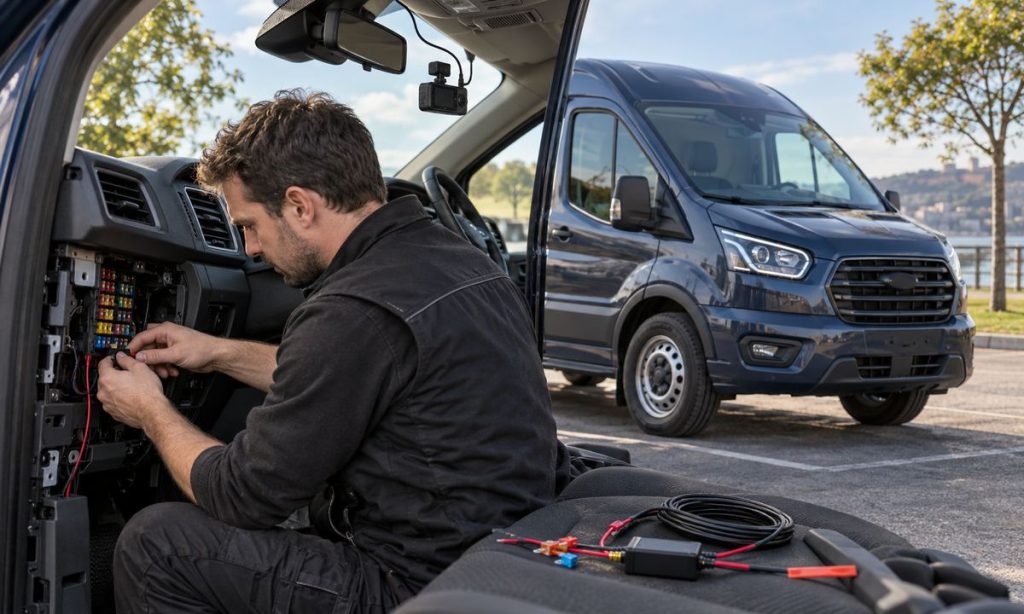
Hardwire kit: A compatible kit can use a switched wire to detect ignition state and a constant supply for parking mode. Most include a low-voltage cutoff or timer intended to stop recording before the vehicle battery falls below a selected threshold. Confirm that the kit is designed for the camera and the van’s electrical system. A cutoff is a safeguard, not a guarantee: battery age, cold weather, repeated short trips, and other vehicle loads affect available reserve.
Dedicated dash-cam battery: An auxiliary camera battery charges while driving and supplies the camera while parked. This can reduce draw from the starter battery, but capacity determines recording time and the pack must be compatible with the camera, charging connection, and vehicle. Mount it securely, keep it clear of heat and moving parts, and follow the maker’s instructions for fuse protection and ventilation.
Verify the Transit Custom circuit before wiring
Transit Custom electrical layouts vary across generations and countries. Fuse panels, battery monitoring, stop-start systems, twin-battery options, upfitter connections, and body configurations can change the correct connection points. Do not copy a fuse number, wire color, or tap location from an online diagram unless it exactly matches the van’s year and specification. Use the vehicle-specific manual and a wiring diagram, or have a qualified installer identify a suitable fused circuit with a meter.
Never tap into airbag, restraint, steering, braking, or other safety-critical circuits. Route wires so they cannot interfere with curtain airbags in the A-pillars or headliner, pedals, steering column, or driver visibility. Use a proper fuse tap and correct fuse rating where permitted; do not splice an unfused lead directly to a battery. An installer should restore trim securely and verify that no warning lights or electrical faults appear after installation.
Set parking mode to protect the van
Choose a recording mode that matches the parking risk and available power. Motion or impact-triggered recording typically uses less energy than continuous recording, though a camera may need a buffer or pre-event capture feature. Set an appropriate cutoff voltage and timer using the camera maker’s guidance. If the van sits for several days, has an older battery, or makes mostly short trips, shorten the parking window or use a dedicated camera battery rather than relying on a low cutoff.
Test the system after the van has been off long enough for its modules to shut down. Confirm that the camera enters parking mode, stops when its cutoff is reached, and resumes driving recording after ignition. Check the battery condition if the van has trouble starting. A dash cam should not be used as a substitute for battery maintenance or repair. If the camera drains the battery, stop using parking mode until the wiring and settings are reviewed.
Choose placement and camera features too
Place the camera within the area allowed by local rules and the vehicle manual, keeping the driver’s view clear. Do not obstruct sensors or the factory camera near the windshield. A rear camera may need a cable route through a moving door or tailgate; protect it from pinching and water. Consider heat tolerance, parking-event recording, buffered capture, night performance, storage capacity, and the ease of removing footage. For a product comparison, see the site’s Ford Transit Custom dash-cam guide, then verify the chosen unit’s power requirements and installation support.
Installation and use checklist
- Confirm the Transit Custom year, market, battery setup, and fuse-box diagram.
- Decide whether you need driving-only recording or true parked coverage.
- Match the hardwire kit or auxiliary battery to the exact camera.
- Set a conservative cutoff and parking timer based on battery condition and use.
- Keep wiring away from airbags, pedals, steering, and safety circuits.
- Test shutdown, parking mode, cutoff, and restart behavior before relying on it.
A professional installer is a good choice if the van is a fleet vehicle, has an upfitter system, uses twin batteries, or has unresolved electrical faults. Keep the camera firmware, time, and storage settings current, and review local recording rules before capturing people or private spaces.
Parked recording raises the same key-off power questions discussed in the site’s Ford Transit Custom accessory battery-drain guide. Review it alongside the dash-cam product guide above, while confirming fuse and battery details for your exact van.
Frequently Asked Questions
Can I use the Transit Custom’s accessory socket for parking recording?
Only if the socket remains powered after shutdown and the camera is designed for that connection. Many sockets switch off, so verify the behavior on the exact van.
Will a low-voltage cutoff prevent every dead-battery problem?
No. It can stop the camera at a chosen threshold, but battery age, cold conditions, short trips, and other loads still affect starting reserve.
Is a separate dash-cam battery better?
It can reduce parked camera draw from the starter battery. Choose one compatible with the camera and vehicle and install it securely.
Can I use a fuse tap on any fuse?
No. The circuit must be suitable and verified for the exact van. Avoid safety-critical circuits and follow the wiring diagram and fuse ratings.
Why does the camera stop recording when the van is parked?
It may be connected to a switched outlet, have parking mode disabled, or have a cutoff or timer set too conservatively. Check the camera manual and installation.
Final Words
For parked-car recording in a Ford Transit Custom, choose between a verified switched socket, a compatible hardwire kit with cutoff, or a separate camera battery. Match the setup to the exact van and battery system, protect safety circuits and airbags during installation, then test parking and restart behavior. If wiring or voltage behavior is uncertain, use a qualified installer.
References
- Ford Transit Custom Owner Manuals (select the year and vehicle version; fuse and electrical details vary).
- Ford Transit Custom Body and Equipment Mounting Manual (guidance for third-party electrical equipment; use the matching generation).
- Garmin Support: Dash-Cam Parking Power and Battery Protection (example of cutoff behavior; camera systems differ).