A slow-start or weak-battery problem on a Ford Raptor needs a symptom-first check. If the starter turns the engine slowly, inspect battery state and condition, terminal and cable connections, grounds, and the starter circuit. If the engine cranks at its usual speed but takes longer to fire, a weak battery may not be the cause; fuel, ignition, sensor, or security faults can produce a long crank. Raptor spans different model years, engines, and electrical equipment, so use the owner’s manual and service data for the exact truck.
First separate slow crank from long crank
Listen and observe during a normal start attempt. A slow, labored rotation, clicking, or dimming lights can point toward low voltage or high resistance in the starting circuit. A normal-speed crank followed by delayed firing suggests a different diagnostic path. Note whether the problem is worse after the truck sits, after short trips, in cold weather, or after accessories have been used. Record dashboard messages and whether a jump start changes the symptom.
Do not keep cranking for long periods or repeat attempts without pause. Ford cautions against prolonged starter operation in owner information; follow the time limits and rest periods in your exact manual. If you smell burning, see smoke, hear grinding, or the cables become hot, stop and arrange inspection. Avoid pushing or towing a vehicle to start it unless the manual specifically permits the method.
Check battery condition and connections safely
Look for visible problems
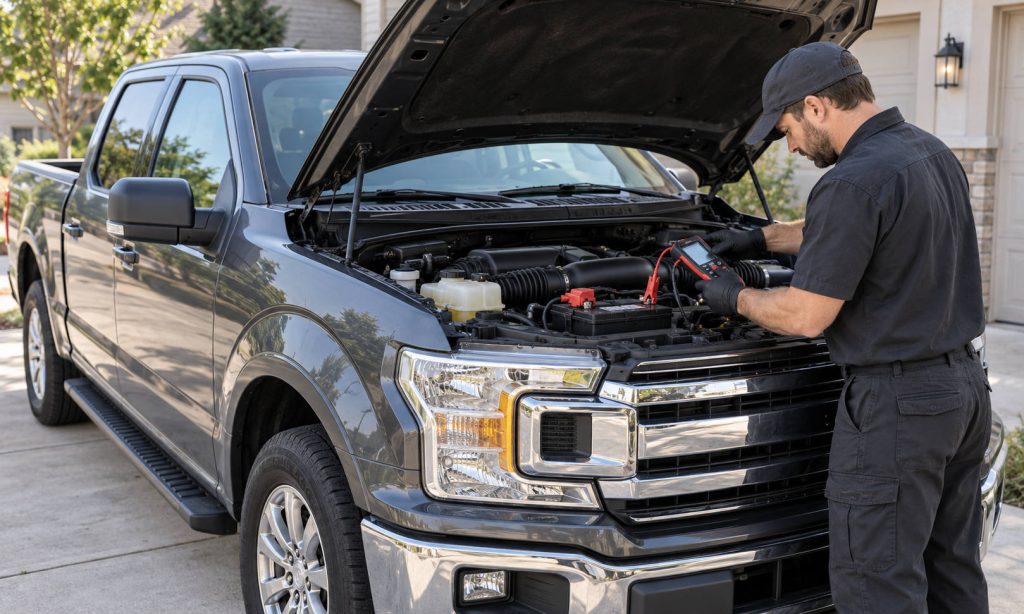
With the engine off and key removed, look for a loose hold-down, cracked case, swelling, leakage, corrosion, or damaged cable insulation. Do not touch a damaged or leaking battery. Keep flames and sparks away; batteries can release explosive gas. If the terminals are corroded or the battery is damaged, use the manual’s precautions or have a technician handle it. Never disconnect a battery while the engine is running.
Check whether the positive and negative connections are secure and whether the ground cables are intact. A battery can test healthy but fail to deliver current through a loose, corroded, or internally damaged connection. The negative path includes grounding points between battery, body, and engine; visual inspection cannot confirm electrical resistance, so a shop may need to perform voltage-drop tests.
Test charge and starting performance
A basic voltage reading is only a snapshot and does not prove the battery can supply starting current. Have the battery charged and tested with equipment appropriate for its chemistry and rating. The tester should use the label’s cold-cranking amp value and correct battery type, not a guessed setting. A battery may need a full charge before a meaningful load or conductance test. Compare results with the test tool and manufacturer guidance.
Cold weather reduces available battery output while the engine may require more effort to turn. Short drives, extended parked periods, and added electrical loads can also leave a battery undercharged. Ford explains battery ratings and maintenance in its support material, but the exact battery specification and replacement procedure for the Raptor are year-dependent. Use the correct group size, chemistry, capacity, and battery-management requirements listed for the vehicle.
Check charging and parasitic draw
If the battery repeatedly loses charge, find out whether it is being replenished while driving and whether the vehicle draws power when parked. A charging-system warning, dim or fluctuating lights, or multiple low-voltage messages deserves prompt diagnosis. Modern charging systems may vary output, so a single idle voltage reading is not enough to condemn an alternator. A technician can test output under specified conditions, inspect belt drive and wiring, and scan for relevant fault codes.
If the battery is weak after the truck sits, note any aftermarket lights, winch controls, dash cameras, audio equipment, trackers, or chargers. An accessory can stay awake or be wired to constant power. A parasitic-draw test must account for modules that remain active briefly after shutdown; pulling fuses at random can interrupt module sleep or erase useful evidence. Our guides cover accessory-related battery drain on a Ford diesel and how to inspect an accessory drain.
Rule out starter and engine causes
When battery charge and connections are verified but cranking remains slow, the starter, starter relay, cables, grounds, or mechanical engine load may need testing. Clicking alone does not identify a failed starter. A technician can compare voltage drop and current draw during cranking and inspect the circuit using the correct year-specific diagram. Do not bridge starter terminals with a tool; that can cause injury, fire, or unintended vehicle movement.
If cranking speed is normal but the engine does not fire promptly, note fuel level, recent repairs, warning indicators, and whether the issue occurs hot or cold. Scan for diagnostic codes before replacing parts. Ignition faults can cause a rough start, but parts should be selected by the exact engine and year. Our Ford Raptor spark-plug guide is relevant to fitment questions; it does not replace fault diagnosis. If the truck’s security indicator flashes or a key warning appears, follow the owner-manual checks rather than assuming the battery is at fault.
A jump start can temporarily restore enough power to start, but it does not show why the battery discharged or whether it is safe to keep driving. Follow the exact Raptor manual for jump-start points, cable order, and precautions because equipment and battery-management systems vary. Do not jump a frozen, cracked, or leaking battery. If the truck needs repeated boosts, arrange a battery and charging-system test rather than treating each jump as a repair.
When to seek service
Arrange professional diagnosis if the battery fails a properly conducted test, the charging warning stays on, the battery repeatedly discharges, the starter grinds or draws excessive current, or the engine cranks normally but will not fire. Tell the technician the model year, engine, battery age and rating, recent accessory installation, and conditions when the fault occurs. Bring the test printout if available.
For comparison, see our slow-start and weak-battery guide for the F-150 5.0, battery diagnosis for Ford Expedition, battery fitment checks for a 2013 F-150, and battery-charger compatibility questions. These examples can help frame the checks, but their exact specifications should not be transferred to a Raptor of another year.
Frequently Asked Questions
How can I tell whether the battery or starter is weak?
A battery and connection test comes first. A technician can use voltage-drop and current-draw tests to assess the starter circuit; symptoms alone cannot confirm a failed part.
Can a battery be bad if the lights still work?
Yes. Lights require less current than engine cranking. A proper charge and starting-capacity test is more informative than accessory operation.
Why does my Raptor start after a jump but fail later?
The battery may be discharged or failing, or the charging system or a parked vehicle load may be involved. Test rather than relying on repeated boosts.
Should I replace the battery with the same cold-cranking amps?
Use the year-specific Ford specification and correct battery type and size. Do not select by CCA alone or ignore battery-management requirements.
Could spark plugs cause a slow crank?
Usually a slow crank points first to voltage delivery or the starting circuit. Plugs are more relevant when the engine cranks normally but runs rough or misfires.
Final Words
Diagnose a slow-start or weak-battery problem on Ford Raptor by separating slow cranking from a long crank, then testing battery state, connections, charging output, and parked draw in that order. Follow the manual for the exact model year, battery type, and jump-start procedure. Replace parts only when testing supports the diagnosis, and stop if there is heat, smoke, leakage, grinding, or a persistent charging warning.